
TEAS entrance exam
The TEAS (Test of Essential Academic Skills) entrance exam is an online test Assessment Technologies Institute (ATI) and is a requirement of the admission process for Stark State College nursing programs. The subjects covered are Math, Science, Reading, and English/Language. All applications to the Associates Degree (RN) and Practical Nursing (LPN) programs require successful completion of the TEAS test.
TEAS Dates – updated each semester
| Date | Time | Location | Max capacity |
|---|---|---|---|
| Sept. 14 | 9:15 a.m. | In person | 25 |
| Sept. 24 | 9:15 a.m. | Remote | 35 |
| Sept. 28 | 9:15 a.m. | In person | 25 |
| Oct. 8 | 9:15 a.m. | Remote | 35 |
| Oct. 19 | 9:15 a.m. | In person | 25 |
| Oct. 29 | 9:15 a.m. | Remote | 35 |
| Nov. 16 | 9:15 a.m. | In person | 25 |
| Nov. 19 | 9:15 a.m. | Remote | 35 |
Payment for the TEAS exam
- Pay $70.00 through one of the following payment options:
- online through the mySSC portal
- phone: 330-494-6170, ext. 4404 or ext. 4060
- in-person MAIN campus: Cashier’s Office, “S” building-3rd floor (S301)
- in-person AKRON location: College Store
- REFUNDS: Please note- refunds are only available if cancellation occurs at least one day prior to the testing date, and the student does not owe fees to the college.
Register for the TEAS exam
- Stop by C107 to register for a date OR
- E-mail testcenter@starkstate.edu
- Include the following in your e-mail:
- Copy of Receipt
- First & Last Name
- Student Number
- Cell Phone Number
- Requested Test Date
- ADN or LPN Student
- First-time test taker, or retake
- Include the following in your e-mail:
**Check with the Testing Center for open seats prior to paying for the TEAS test if the testing date is less than two weeks away
Prior to taking TEAS exam
- Create an ATI account at atitesting.com
- Remember your username & password (take a screenshot or write on a piece of paper). This information is required each time you log-in to your account, and when you take the TEAS test.
Student study and prep resources
- Online resources available directly through ATI testing.com
- TEAS Prep Options
- SmartPrep
- Optional Study Materials for purchase
- LAUNCH Nursing Academic Readiness Student Orientation offers live, 1:1 for personalized coaching. There is a cost for this service. To view the informational webinar, click register and choose one of the multiple dates available to attend. Also, check out the other events on this page that could assist you in successfully passing the TEAS test.
- Check with your local library, or search online for study materials for the ATI TEAS test Version 7.
- Science Learning Center offers tutoring for the Science portion of the TEAS.
- Contact the Main campus in room H200, ext. 5278, or the Akron Campus in room A111, ext. 4906, for more information.
- Math Tutoring Centers at Akron- A108 and Main- E214, are available for tutoring for the math section of the TEAS. You must bring your study guide/book with you to the appointment. Contact them via email: mathcenter@starkstate.edu, or visit them in-person.
- The Writing Center and ELL Labs offer support for students regarding the Reading and English Language portions of the TEAS test. Students can make appointments with the Writing Center and ELL Lab tutors through WC Online. More information about our services is in our Writing Center Guide. ELL students can find links here: ELL Student Support.
Additional information
- ACCOMMODATIONS: If you require accommodations for extended time, contact Disability Support Services (DSS). When you register for the test, please notify the testcenter@starkstate.edu of your accommodations. This should be arranged at least two weeks in advance through DSS.
- LATE ARRIVALS: Tests will not be approved 45 minutes after start time.
- TESTING FORMATS: “In-person” testing is completed at the Testing Center on Main Campus (C107). “Remote” testing is completed with your own computer/laptop from your home or another quiet location where you have reliable internet access.
- RETAKES:
- For ADN (RN program) students: there must be 60 calendar days since the previous exam attempt. Only two tests are allowed in the same calendar year.
- LPN students are permitted multiple attempts in a calendar year but need to state the number of retakes.
- If retaking the test, please include this information because the proctor will need to know the number of times that you have taken the TEAS.
- Additional Nursing Application Information- ADN
- Additional Nursing Application Information- LPN
How to access TEAS results for Nursing Application Requirement
Step 1 – Access my results
To access results, sign in to www.atitesting.com with your Username and Password. From the home page, click the My Results tab to access your full transcript.

Step 2 – Find the TEAS assessment
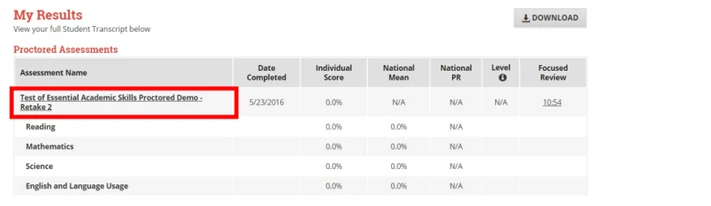
Under the Poctored Assessments section, you should find the instance of the TEAS exam that you need, and click the assessment’s name to view your individual performance profile.
Step 3 – Download results
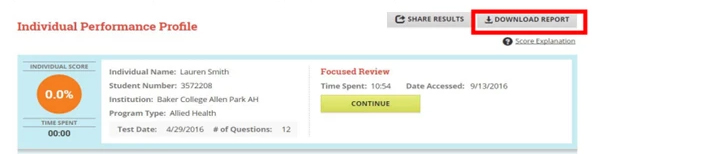
From your individual performance profile, click on Download Report. This will download the results report file to your computer, where you can save in the appropriate area or print.
Office C107
(main campus)
330-494-6170 ext. 4500
Take the next step
Whether you’re just starting out, making your college comeback or looking for a change, you belong at Stark State.